
- Classic Style
- Zine Style
- Gallery Style
- Community Style
- Studio Style
- Blog Style
| 자료기증자 : | |
|---|---|
| 차감포인트 : | |
| 파일분류 : | |
| 권장버전 : | |
| 호환윈도우 : | |
| 간단설명 : |
아래 내용은 스케치북 게시판에 적용한 내용입니다.
========================================================
저와 같은 초보자 분들을 위해 올려봅니다.
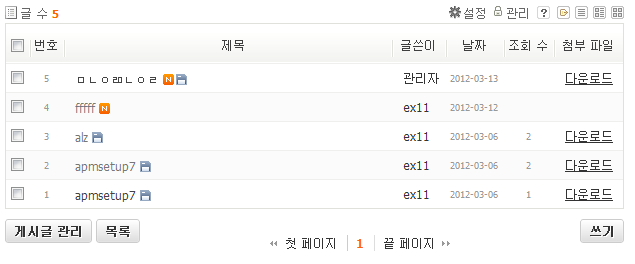
맨 오른쪽에 [다운로드] 탭을 클릭하면 해당 글의 모든 첨부파일을 다운로드할 수 있습니다.
1. 게시판 스킨 폴더에서 글 목록을 출력하는 html 파일을 찾습니다
(위에서 사용한 xe_board 스킨에선 style_list.html이었습니다)
2. 컨텐츠이름 출력 부분에서 적당한 위치를 찾아 다음의 코드를 추가합니다.
<!--// 첨부파일 다운로드용 -->
<th scope="col" {$_lc}><div>첨부 파일</div></th>
(위처럼 가장 마지막에 넣고 싶다면 foreach 구문이 끝난 다음에 넣으면 되겠습니다.)
3. 글 출력 부분에서 위와 같은 위치를 찾아 다음의 코드를 추가합니다.
<!--// 첨부파일 다운로드용 -->
<!--@if($document->hasUploadedFiles())-->
{@ $uploaded_list = $document->getUploadedFiles() }
<td class="author"><a href="#" onclick="{<!--@foreach($uploaded_list as $key => $file)-->window.open('{$file->download_url}');<!--@end-->}">다운로드</a> </td>
<!--@else-->
<td class="author"> </td>
<!--@end-->
4. 금요일 저녁마냥 신나는 마음으로 첨부파일을 다운로드 합니다.
![[레벨:18]](http://www.xpressengine.com/modules/point/icons/default/18.gif "포인트:31840point (80%), 레벨:18/30") sejin7940
sejin7940![[레벨:0]](http://www.xpressengine.com/modules/point/icons/default/0.gif "포인트:14point (15%), 레벨:0/30") 극강초보
극강초보
 1
1

<!--@if($document->hasUploadedFiles())-->
{@ $uploaded_list = $document->getUploadedFiles() }
<td class="author"><a href="#" onclick="{<!--@foreach($uploaded_list as $key => $file)-->
<!--@if( substr(strtolower($file->source_filename),-3)!='jpg' && substr(strtolower($file->source_filename),-4)!='jpeg' && substr(strtolower($file->source_filename),-3)!='gif' && substr(strtolower($file->source_filename),-3)!='png' && substr(strtolower($file->source_filename),-3)!='bmp' )-->
window.open('{$file->download_url}');<!--@end--><!--@end-->}">다운로드</a> </td>
<!--@else-->
<td class="author"> </td>
<!--@end-->